> ## Documentation Index
> Fetch the complete documentation index at: https://docs.xenonhub.pro/llms.txt
> Use this file to discover all available pages before exploring further.
# Roblox Installtion
> รวมวิธีการใช้งานฟังชั่นย้อนเวอร์ชั่น Roblox และอื่นๆ
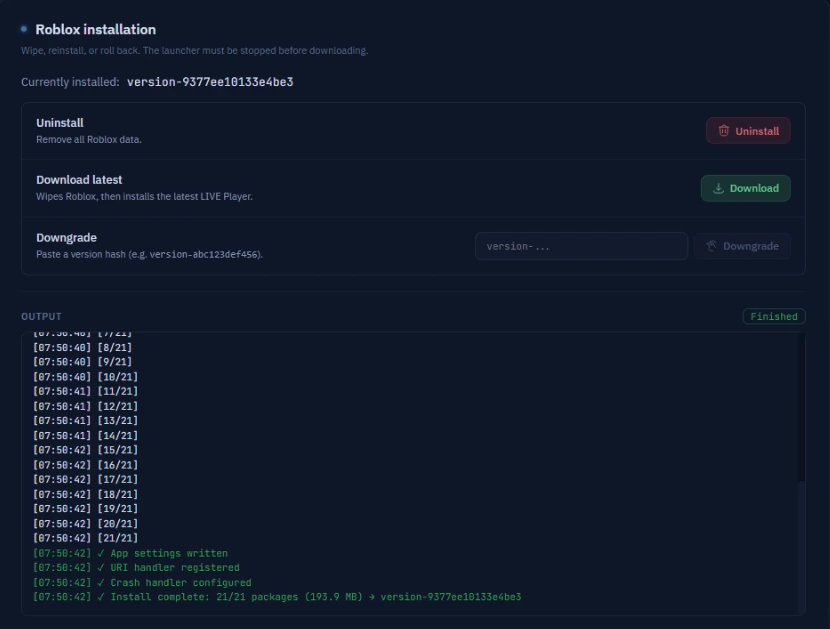
## ✅ Currently Installed
คือเวอร์ชั่น Roblox ล่าสุดในตอนนี้ ถ้าต้องการจะโหลดให้กดปุ่ม Download สีเขียวได้เลย
 ***
## 🔻 Downgrade
สำหรับตัวรันที่ใช้งานเวอร์ชั่นล่าสุดของ Roblox ไม่ได้ คุณสามารถกดย้อนเวอร์ชั่นได้
เลขเวอร์ชั่นเก่า คุณสามารถหาได้ที่ Discord ของเรา ห้อง #📝・อัปเดตโรบล็อค
ในดิสคอร์ด Xenon Community - [https://discord.gg/xenonhub](https://discord.com/invite/xenonhub)
***
## 🔻 Downgrade
สำหรับตัวรันที่ใช้งานเวอร์ชั่นล่าสุดของ Roblox ไม่ได้ คุณสามารถกดย้อนเวอร์ชั่นได้
เลขเวอร์ชั่นเก่า คุณสามารถหาได้ที่ Discord ของเรา ห้อง #📝・อัปเดตโรบล็อค
ในดิสคอร์ด Xenon Community - [https://discord.gg/xenonhub](https://discord.com/invite/xenonhub)
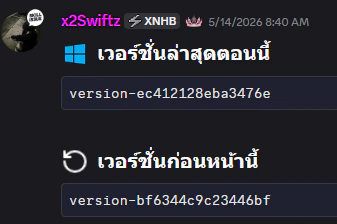 ให้ไปก็อปโค้ดตัวเวอร์ชั่นเก่ามา แล้วเอาไปวางในช่องของ Downgrade ได้เลยจากนั้นกดปุ่ม Downgrade ครับแค่นี้แหละง่ายๆ ถ้าตัวรันใช้กับตัวเวอร์ชั่นล่าสุดได้แล้ว ให้ทำการ Uninstall ทั้งหมดเลย วิธีการทำก็ตามด้านล่างนี้เลยครับ 👇
***
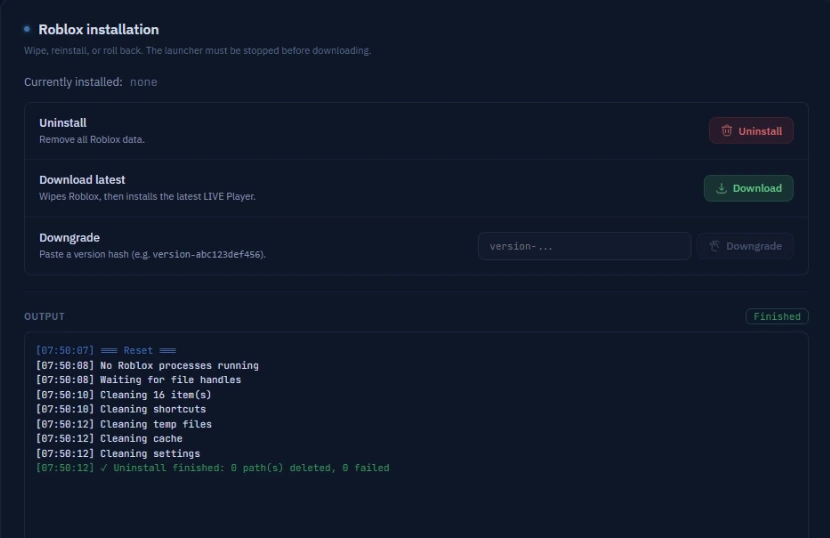
## 🗑️ Uninstall
ให้กด Stop ในโปรแกรม Storm ก่อนกดใช้ Uninstall โดยการทำงานของตัวนี้คือจะปิด Roblox ทั้งหมดที่ทำงานอยู่และจะถอนการติดตั้งทั้งหมดของ Roblox
หากต้องการติดตั้งตัวเวอร์ชั่นล่าสุด กดปุ่มสีเขียว Download เพื่อใช้เวอร์ชั่นล่าสุดได้เลย
ให้ไปก็อปโค้ดตัวเวอร์ชั่นเก่ามา แล้วเอาไปวางในช่องของ Downgrade ได้เลยจากนั้นกดปุ่ม Downgrade ครับแค่นี้แหละง่ายๆ ถ้าตัวรันใช้กับตัวเวอร์ชั่นล่าสุดได้แล้ว ให้ทำการ Uninstall ทั้งหมดเลย วิธีการทำก็ตามด้านล่างนี้เลยครับ 👇
***
## 🗑️ Uninstall
ให้กด Stop ในโปรแกรม Storm ก่อนกดใช้ Uninstall โดยการทำงานของตัวนี้คือจะปิด Roblox ทั้งหมดที่ทำงานอยู่และจะถอนการติดตั้งทั้งหมดของ Roblox
หากต้องการติดตั้งตัวเวอร์ชั่นล่าสุด กดปุ่มสีเขียว Download เพื่อใช้เวอร์ชั่นล่าสุดได้เลย